Latest / Story
What Is an Authorization Boundary and How Do I Draw One?
Your authorizing official will ask what your system covers. If you cannot draw the line, the review stalls. A clear boundary makes every other part of the package easier.
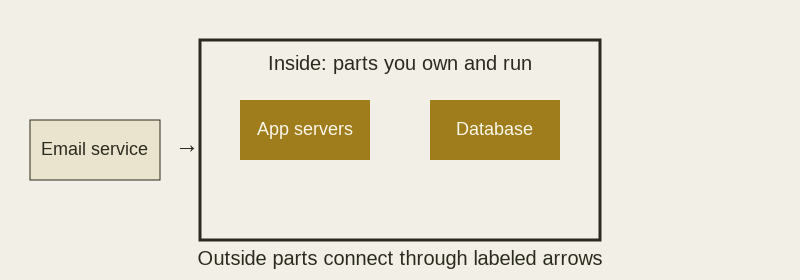
ATO means Authorization to Operate. RMF means Risk Management Framework. An authorization boundary is the line around everything the authorization covers. Inside the line sit the parts you own and run. Outside the line sit the services and systems you only use.
What goes inside the line
Put every part you control inside the line. That means your servers, your apps, and your databases. It also means your people and your daily processes. If your team runs it, it belongs inside. If your team configures it, it belongs inside too.
Name each part in plain words. A part named "the cloud" tells the reader nothing. A part named "the payroll app on two servers" tells the reader a lot. List the parts in a table. Give each part one line and one owner.
What stays outside the line
Outside parts are services you use but do not run. A cloud email service is a common example. A vendor help desk tool is another. These parts still matter to security. You document them as inherited controls. Inherited means another party provides the control for you. You still record who provides it and how you check it.
Draw each outside part as a box outside the line. Draw an arrow for each connection into your system. Label each arrow with the data it carries. An unlabeled arrow is a question the reviewer must ask.
How to draw the line in five steps
First, list every part of the system. Second, mark each part as owned or used. Third, list every connection to an outside part. Fourth, list every type of data that crosses the line. Fifth, write one paragraph that states the line in words. The paragraph should say what is in and what is out. If the paragraph needs a second page, the line is too vague.
Three mistakes that cause rework
The first mistake is a boundary that follows the org chart. Teams change, but systems do not follow teams. Draw the line around the system, not the team. The second mistake is leaving shared parts out. A shared login service affects your system even if another team runs it. Name it outside the line and record the inherited controls. The third mistake is a boundary that grows without a record. Each time you add a part, update the drawing and the paragraph. An old drawing and a new system will fail review.
What the authorizing official checks
The authorizing official checks three things. First, does the boundary cover all parts that hold sensitive data? Second, are outside parts named with their connections? Third, do the controls match the parts inside the line? A control with no part behind it is a gap. A part with no control behind it is also a gap. Close both before you submit.
Sources
- NIST SP 800-37 Revision 2, Risk Management Framework.
- NIST SP 800-18 Revision 1, Guide for Developing Security Plans.
- Original diagram by PolicyCortex.
Next step
Want evidence tied to each control from live systems? See how PolicyCortex collects it.